Process constraintsBusiness processes Approval rules Roles and permissions
Collaborate · Trace · Authorize
Reads company evidence and, following approval rules, delivers results to business systems
Human approval
People retain control of key decisions
Approval decision
RejectApprove
Verification and delivery
Produce results and write back to business systems
Execution results
EvidenceDocuments and process records
ResultsResults and data metrics
System write-backUpdate business systems
Enterprise architecture
Five layers that bring AI into real operations
From data connections to results written back, every layer has clear boundaries, permissions and audit.
You and your teamSet goals · Confirm plans · Approve actions · Accept results
05
Delivery
Results are versioned and written back only after acceptance and confirmation; proven flows can be reused.
Versioned results
Acceptance and version compare
Write-back after confirmation
Playbook
Automation
04
Governance
Every external action is confirmed first and judged by its receipt; people make the key decisions.
Plan card
Authorization card
Approval scope
Execution receipts
Audit records
03
Orchestration
A lead specialist compiles the task into an execution graph, runs steps in parallel and cross-checks them.
Lead specialist
Specialist graph
Skill graph
Execution graph
Cross-review
02
Knowledge
Business facts carry their source, date and access rights, giving every step its evidence.
Knowledge bases
Knowledge graph
Workspace rules
Metric definitions
Memory
01
Connection
Business systems and external channels are read with authorization; reads and writes are separate, read-only first.
Connectors
Plugins
Material import
Inbox sources
Read/write separation
Business systems and dataERP · CRM · HR · Stores and channels · Documents and reports
Each layer is delivered according to project scope and Sage app releases; every connected system and action is assessed and authorized on its own.
Business edition
One team, one set of rules, one body of company knowledge
People and digital specialists work in one workspace, while rules, access, knowledge and audit are managed by the business.
Sage app Inbox · Design prototype · Sample data
Everything waiting for you, in one place
Approvals, information requests, acceptance and invitations land in Needs my decision and stay on top; external messages pass rule and model filters before they reach the Inbox.
An approval covers only the targets, actions, scope and time on the card
Handle it in the Inbox or the task and both stay in sync
The notification center reminds you once, without repeating the queue
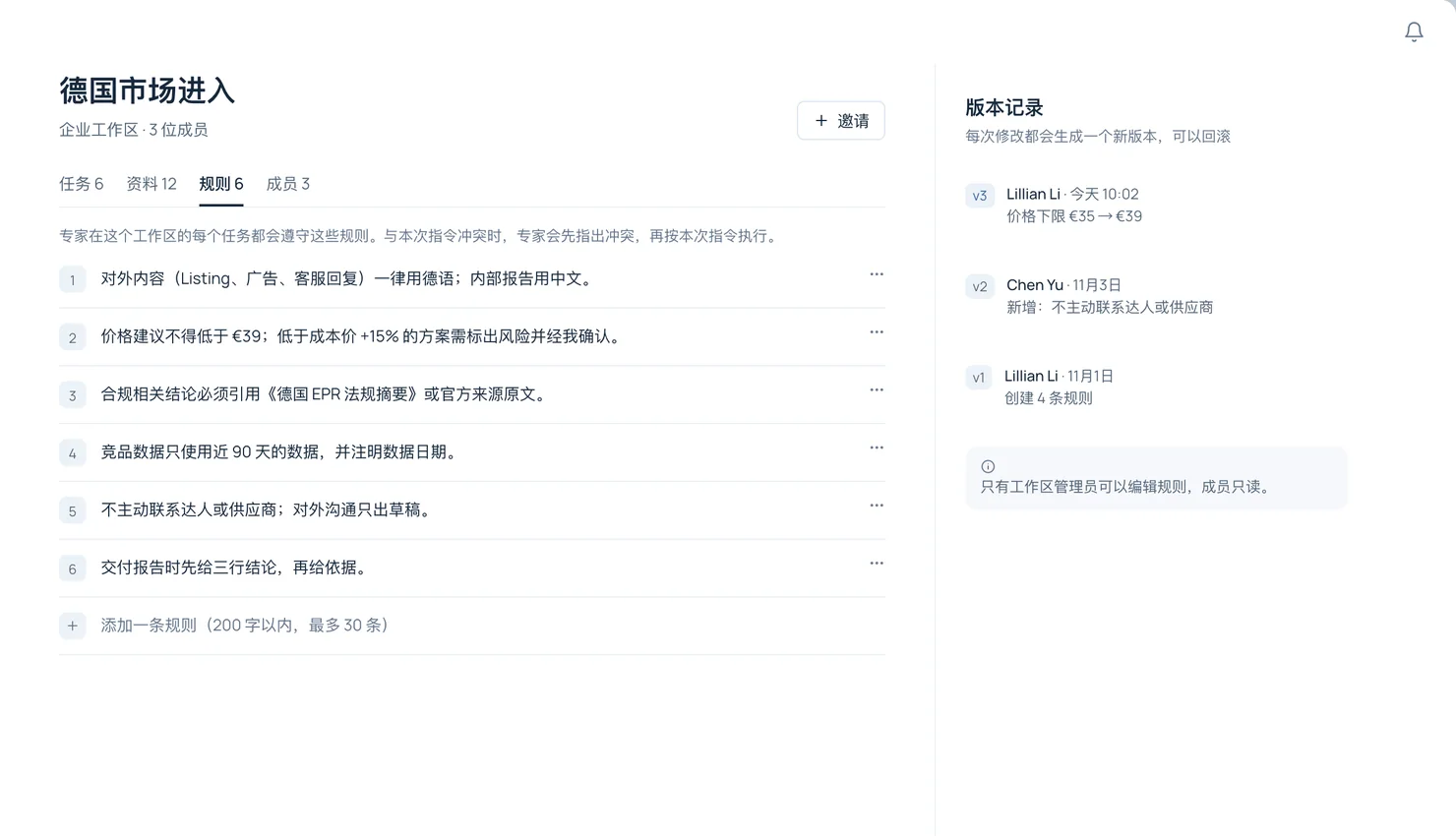
Sage app Workspace rules · Design prototype · Sample data
Team conventions become rules every task follows
Up to 30 rules of 200 characters each apply to every task in the workspace; when one conflicts with your current instruction, the specialist points it out first.
Every change creates a version with author and diff, and can be rolled back
Workspace admins edit; members can only read
For example: never price below cost plus 15%; compliance conclusions must cite the regulation
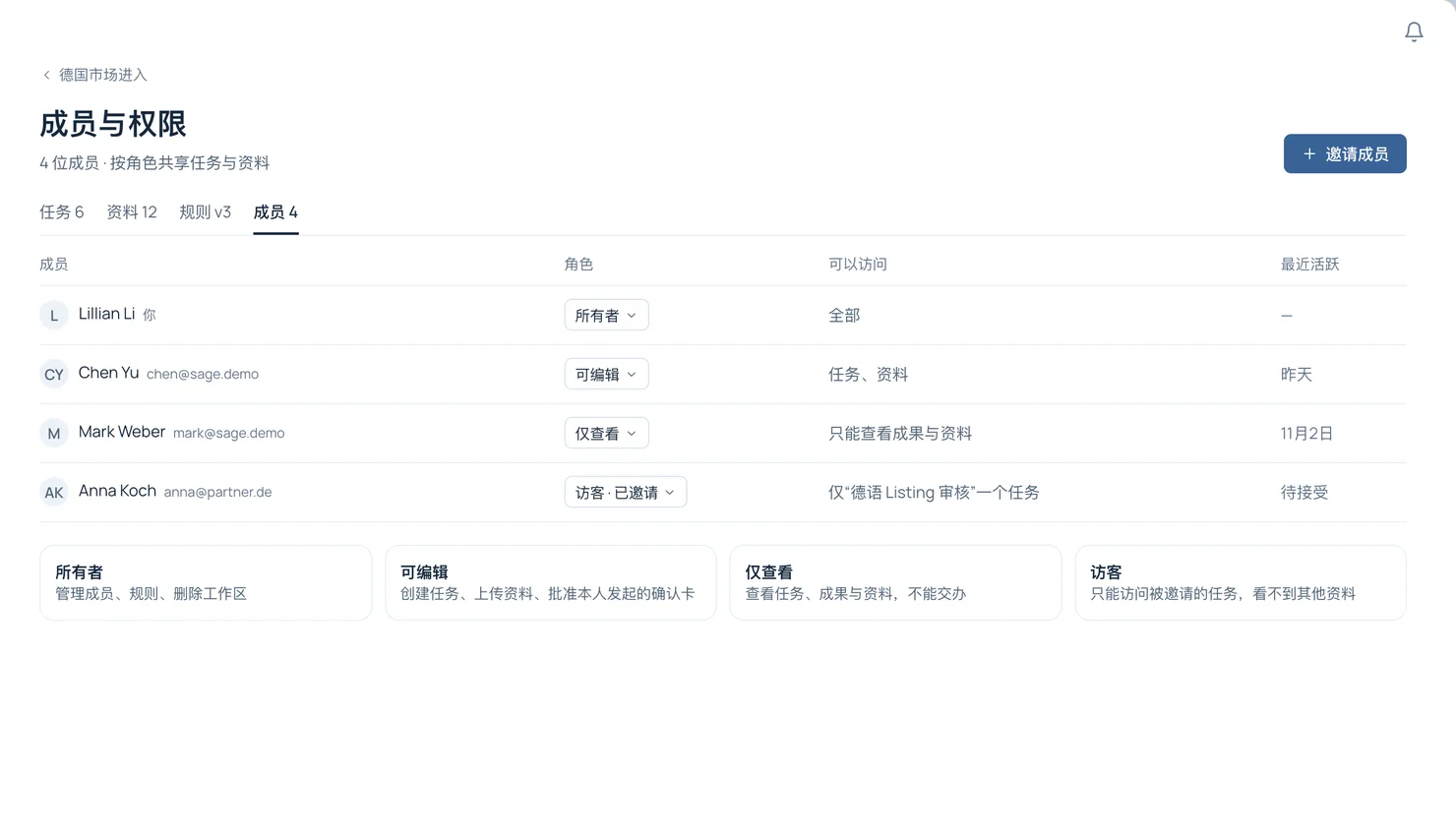
Sage app Members and access · Design prototype · Sample data
Share tasks and materials by role
Owner, editor, viewer and guest roles; guests see only the tasks they are invited to.
A business workspace is visible only to its creator until access is granted
A member’s edit rights never become a specialist’s execution rights
Personal workspace materials are never shared with the business automatically
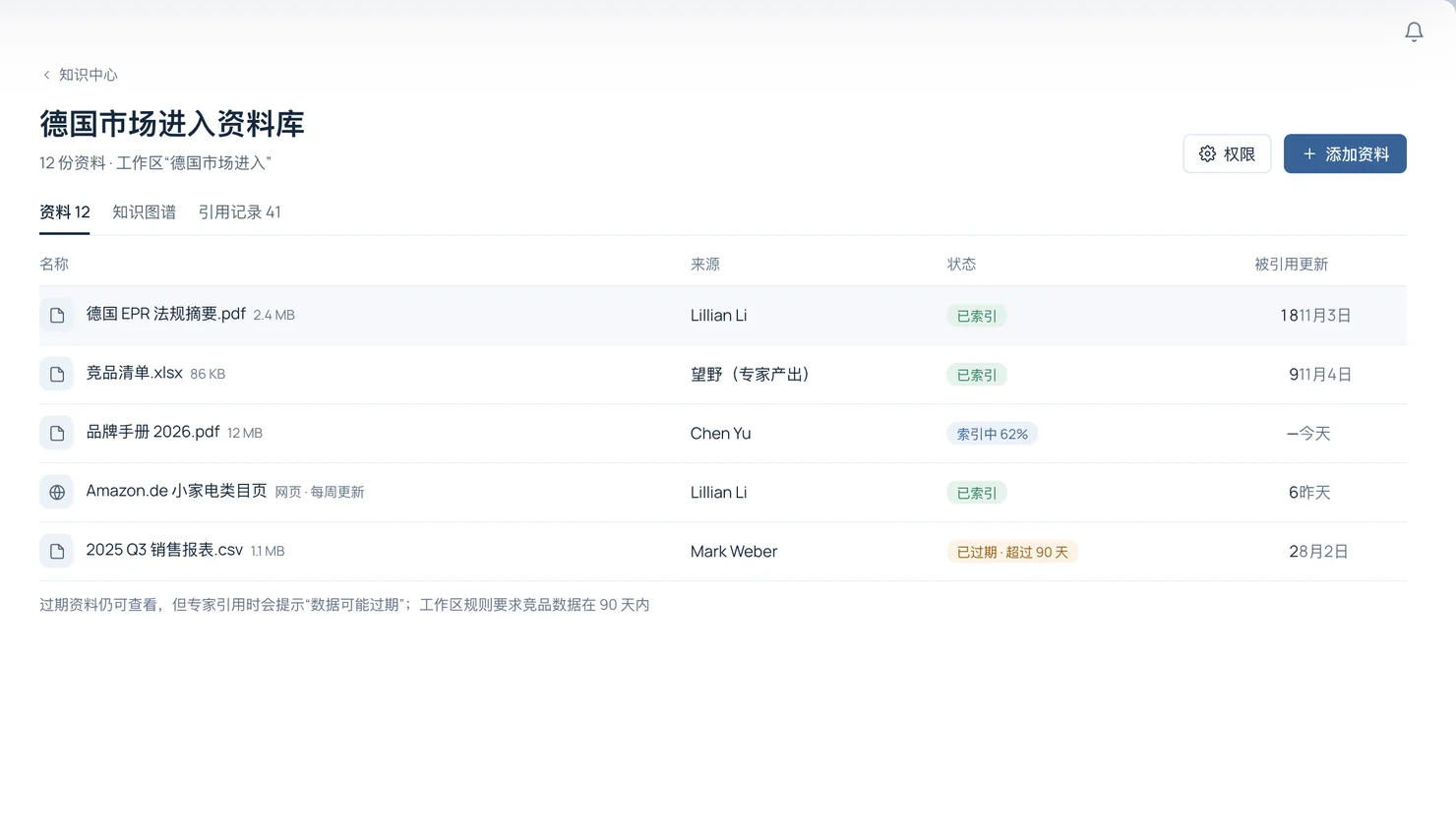
Sage app Business knowledge · Design prototype · Sample data
Company materials with versions, access and status
Materials are scoped to a person, a workspace or the business; they can be cited only after indexing, and a citation pins the version.
The list shows source, indexing status and when each was last cited
Stale materials are marked expired and flagged when cited
Access and edit rights are set per library
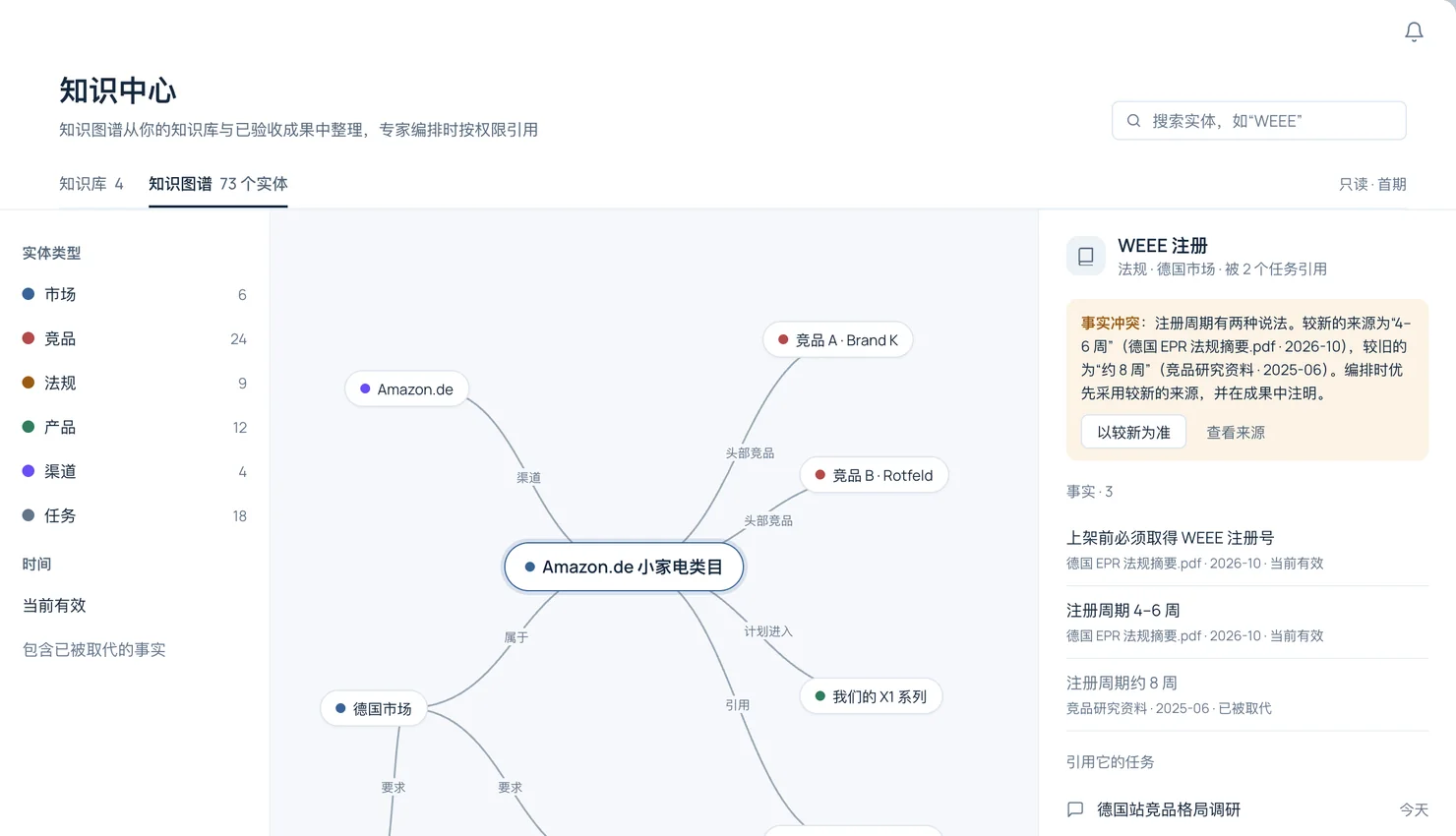
Sage app Knowledge graph · Design prototype · Sample data
Entities and facts from your materials, with conflicts flagged
Brands, products, markets, channels, competitors and regulations, each fact with its source, date and access; conflicting sources are flagged explicitly.
Specialists use only what you explicitly add to a task
AI-identified relations are labeled and never treated as confirmed facts
The first release is a read-only view; writing facts back is planned for phase two
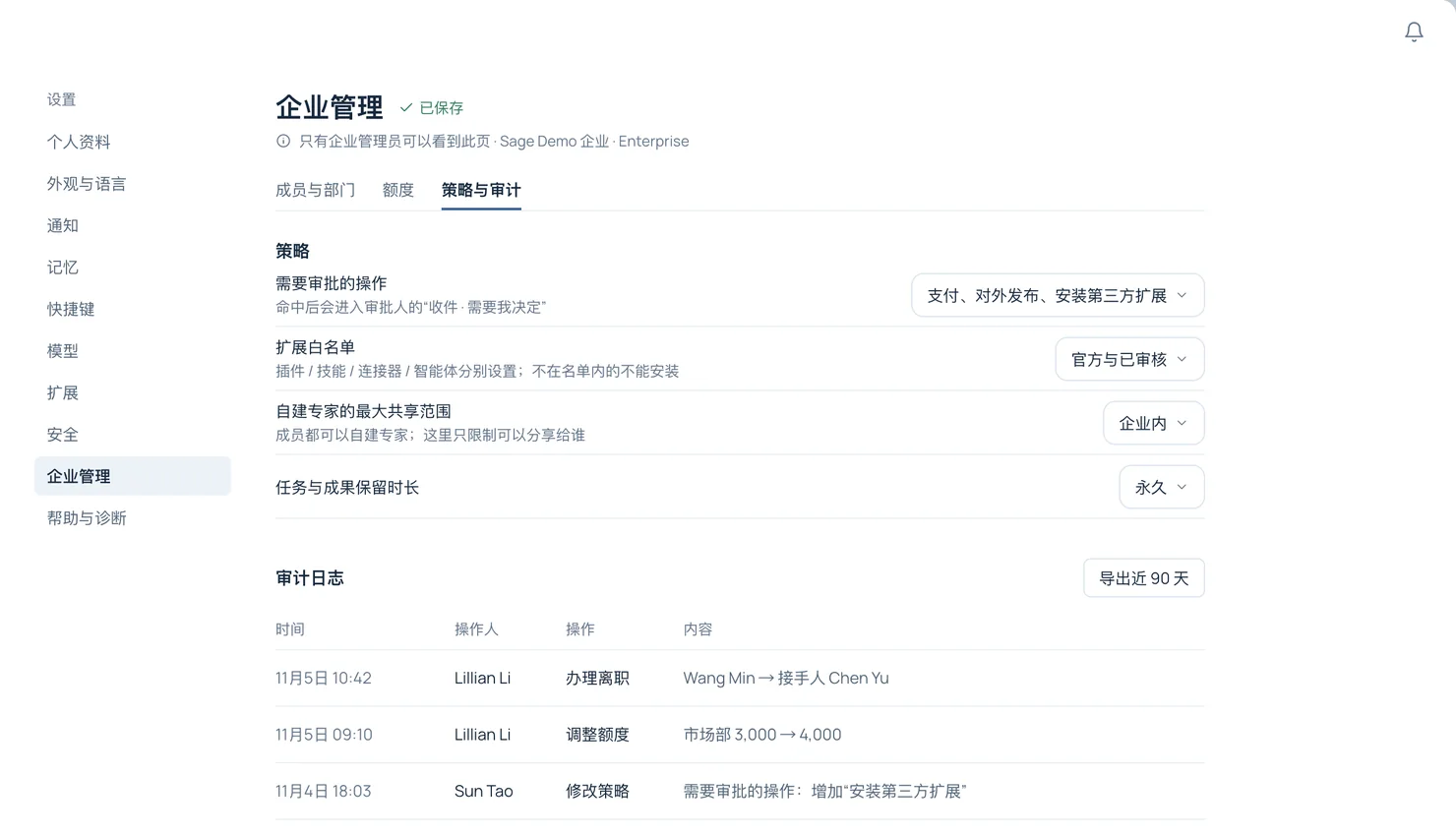
Sage app Business admin · Design prototype · Sample data
Members, credits and policy, managed centrally
Admins manage members and departments, allocate business credits by department, and set which actions need approval, the extension allowlist and how far custom specialists can be shared.
Key actions are written to an audit log that can be exported for 90 days
Only business admins can see this page
Business-plan entitlements follow the official release
Screens come from Sage app design prototypes (interface in Chinese) with sample data; collaboration rules such as multi-person approval are still being finalized, and the released app prevails.
01 / Standard product
Reuse shared capabilities
Business scenarios · Specialist roles · Collaboration and authorization
Business goalDefine questions and metrics
ProposalBuilt on Sage capabilities Propose actionable plans
Human authorizationHuman control of key decisions
ReviewVerify and apply outcomes
Joint work Deliverables
02 / Enterprise implementation
Adapt to company differences
Data
Connect company data and align metrics
Knowledge
Capture knowledge and key business relationships
Scenarios
Adapt workflows and approvals for implementation
Systems
Connect existing systems, assessing read-only integration first
WHAT WE BUILD TOGETHER
Every customization has a defined deliverable
Deliver usable outcomes across data, knowledge, scenarios and systems, based on your business needs.
Data collection and governance
Connect authorized sources, align standards and fields, and build reusable company data assets.
Deliverables:Data inventory, metric dictionary and quality reports
Enterprise knowledge and knowledge graphs
Organize business knowledge and rules into a knowledge base AI can reference. Assess knowledge-graph scope against actual needs.
Deliverables:Knowledge base, citation rules and relationship model
Scenario and digital employee customization
Design human–AI workflows and roles around specific scenarios, integrated with actual processes and approvals.
Deliverables:Role responsibilities, business rules and deliverable templates
Product and system integration
Connect existing systems through standard interfaces or custom development. Control access and business operations with permissions; writes require separate authorization.
Deliverables:Business workspace, interfaces and verification records
OUR APPROACH
Start with one problem, then expand
Validate within an appropriate scope, then extend to more scenarios.
01 / 06
Problem diagnosis
Define the decision to support, current practices and constraints together. Agree on objectives, ownership and exclusions.
Stage deliverables
Problem statement, current workflow and baseline metrics
Next-stage conditions
The business owner confirms the problem, goals and scope. Gather missing information before implementation.
Illustrative scenario
Replenishment and fulfillment
Bring demand, lead time and funding constraints into one candidate plan.
Get the right products to the right markets at the right time.
Scenario specification
Define objectives, scope and business rules
Candidate plans
Propose replenishment alternatives
Approval records
Human review and adjustment
Awaiting approval
Acceptance checklist
Verify outcomes and expansion criteria
TWO WAYS TO WORK WITH SAGE
Choose the right way to work together
Standard Sage product
Use standard business workflows and digital employees in the Sage app, with no implementation project required.
Based on your needs, data, knowledge and scenarios, delivered within agreed scope, step by step.
FAQ
Before we start working together
Where is data stored? Is it used to train models?
Personal information is stored in mainland China (Tencent Cloud, Shanghai region), and task content is never used to train models. Where a business contract says otherwise, the contract applies.
What do we need before implementation?
Agree on data sources, access scope, deliverables, acceptance and each side’s responsibilities, then start a controlled pilot with one business question.
Do we have to build a knowledge graph?
Not necessarily. We first check whether task inputs or configuration can solve the problem; a knowledge graph is not required for every project.
Will Sage change prices, purchase or publish on its own?
Sage acts only within the targets, scope and budget you authorize, never skips steps that need human confirmation, and you can withdraw authorization at any time.
How is pricing structured?
Subscriptions, implementation, model and resource usage, and ongoing maintenance are agreed separately, as set out in the contract.
Can Sage be deployed privately?
Business subscriptions do not include private deployment, unlimited customization or lifetime maintenance by default; if you need them, scope and cost are assessed in a dedicated implementation.
 Deliverables:Data inventory, metric dictionary and quality reports

 ERPOrders · Finance · Supply chain
 CRMCustomers · Opportunities · Service
 HROrganization · People · Performance
 Other systemsOA · PLM · …
 Reports
 Process constraintsBusiness processes